Home





narrata turns price series into short text that an LLM can reason about quickly.
It is designed for situations where a chart is easy for a human to read,
but you need an agent to consume the same information as text.
Installation
From PyPI:
With optional extras for enhanced backends:
Quickstart
narrate(...) takes a pandas OHLCV DataFrame with a datetime index.
import yfinance as yf
from narrata import narrate

df = yf.download("AAPL", period="1y", multi_level_index=False)
print(narrate(df, ticker="AAPL"))
Any data source works — yfinance, OpenBB, CSV, database — as long as you have a DataFrame with at least a Close column and a DatetimeIndex.
Column names are case-insensitive (close works as well as Close), Adj Close is automatically preferred over raw Close when both exist, and Volume is optional.
For shorter histories or missing columns, narrata keeps running and silently omits sections it cannot compute — no wasted tokens on placeholder text.
Close-only mode: If your data has only Close (or Close + Volume) without Open/High/Low, narrata works — summary, regime, indicators, symbolic encoding, and support/resistance all run normally. Patterns and candlestick sections are omitted automatically.
Example output:
AAPL (251 pts, daily): ▅▄▃▁▂▁▁▂▂▂▄▄▆▇▇██▆▆▆
Date range: 2025-02-14 to 2026-02-13
Range: [171.67, 285.92]  Mean: 235.06  Std: 28.36
Start: 243.54  End: 255.78  Change: +5.03%
Regime: Uptrend since 2025-05-07 (low volatility)
RSI(14): 39.6 (neutral-bearish)  MACD: bearish crossover 0 days ago
BB: lower half
SMA 50/200: golden cross
Volume: 0.94x 20-day avg (average)
Volatility: 84th percentile (high)
SAX(16): ecabbabbdegghhhg
Candlestick: Inside Bar on 2026-02-10
Support: 201.77 (26 touches), 208.38 (23 touches)  Resistance: 270.88 (24 touches), 257.57 (22 touches)
Token compression
The whole point of narrata is fitting price context into an LLM prompt without wasting tokens. On a 251-day AAPL OHLCV DataFrame:
| Representation | Tokens (gpt-4o) |
|---|---|
df.to_string() |
~9,000 |
df.to_csv() |
~10,700 |
narrate(df) |
~260 |
That's ~35–41x compression while preserving regime, indicators, patterns, and support/resistance.
Reproduce this comparison:
import tiktoken
import pandas as pd
from narrata import narrate

enc = tiktoken.encoding_for_model("gpt-4o")
# df = your OHLCV DataFrame
print(f"Raw:     {len(enc.encode(df.to_string())):,} tokens")
print(f"CSV:     {len(enc.encode(df.to_csv())):,} tokens")
print(f"narrate: {len(enc.encode(narrate(df))):,} tokens")
Fallback vs extras (same input)
Using the same static real-market MSFT dataset (251 daily points, yfinance fixture):
Use separate clean virtual environments when comparing fallback vs extras.
Fallback-only (pip install narrata):
MSFT (251 pts, daily): ▂▁▁▁▃▄▅▇▇█▇███▇▆▅▆▆▂
Date range: 2025-02-14 to 2026-02-13
Range: [354.56, 542.07]  Mean: 466.98  Std: 49.62
Start: 408.43  End: 401.32  Change: -1.74%
Regime: Downtrend since 2026-01-29 (high volatility)
RSI(14): 32.4 (neutral-bearish)  MACD: bearish crossover 11 days ago
BB: lower half
SMA 50/200: death cross 17 days ago
Volume: 0.74x 20-day avg (below average)
Volatility: 94th percentile (extremely high)
SAX(16): aaabdfggggggffdb
Candlestick: Inside Bar on 2026-02-13
Support: 393.67 (15 touches), 378.77 (8 touches)  Resistance: 510.83 (34 touches), 481.63 (21 touches)
With extras (pip install "narrata[all]"):
MSFT (251 pts, daily): ▂▁▁▁▃▄▅▇▇█▇███▇▆▅▆▆▂
Date range: 2025-02-14 to 2026-02-13
Range: [354.56, 542.07]  Mean: 466.98  Std: 49.62
Start: 408.43  End: 401.32  Change: -1.74%
Regime: Ranging since 2025-02-18 (low volatility)
RSI(14): 32.4 (neutral-bearish)  MACD: bearish crossover 11 days ago
BB: lower half
SMA 50/200: death cross 17 days ago
Volume: 0.74x 20-day avg (below average)
Volatility: 94th percentile (extremely high)
SAX(16): aaabdefggggggfed
Candlestick: Inside Bar on 2026-02-13
Support: 393.67 (15 touches), 378.77 (8 touches)  Resistance: 510.83 (34 touches), 481.63 (21 touches)
Main differences in this run:
- Regime changed: Regime: Downtrend since 2026-01-29 (high volatility) -> Regime: Ranging since 2025-02-18 (low volatility)
- SAX(16) changed: SAX(16): aaabdfggggggffdb -> SAX(16): aaabdefggggggfed
Crypto data adapters
Built-in adapters for common crypto data sources:
from narrata import from_ccxt, from_coingecko, narrate

# ccxt (Binance, Coinbase, Kraken, etc.)
import ccxt
exchange = ccxt.binance()
ohlcv = exchange.fetch_ohlcv("BTC/USDT", "15m", limit=200)
df = from_ccxt(ohlcv, ticker="BTC/USDT")
print(narrate(df, currency_symbol="$", precision=0))

# CoinGecko (close + volume only, no OHLC)
data = cg.get_coin_market_chart_by_id(id="bitcoin", vs_currency="usd", days=90)
df = from_coingecko(data, ticker="BTC")
print(narrate(df, currency_symbol="$", precision=0))

# yfinance works directly — no adapter needed
import yfinance as yf
df = yf.download("BTC-USD", period="1y", multi_level_index=False)
print(narrate(df, ticker="BTC", precision=0))
CoinGecko data has no Open/High/Low, so patterns and candlestick sections are silently omitted. All other sections work normally.
Compose your own output
Use lower-level functions when you want full control:
from narrata import analyze_summary, describe_summary, make_sparkline

summary = analyze_summary(df)
text_block = describe_summary(summary)
spark = make_sparkline(df["Close"].tolist(), width=12)

print(text_block)
print(f"Close sparkline: {spark}")
Compare two periods
compare(...) produces a compact diff narrative showing how a series changed between two time windows:
from narrata import compare

df_q1 = df["2025-01":"2025-03"]
df_q2 = df["2025-04":"2025-06"]
print(compare(df_q1, df_q2, ticker="AAPL"))
Example output:
AAPL: 2025-01-02..2025-03-31 → 2025-04-01..2025-06-30
Price: 243.54 → 215.30 (-11.6%)
Range: [220.10, 260.40] → [195.40, 230.10]
Regime: Uptrend (low vol) → Downtrend (high vol)
RSI(14): 58.2 (neutral) → 32.4 (neutral-bearish)
MACD: bullish → bearish crossover
Volume: 1.02x avg (average) → 0.85x avg (below average)
Volatility: 42nd pctl (moderate) → 85th pctl (high)
SAX(16): ddccbbaa → aabbccdd
Support: 225.40, 220.10 → 195.40, 200.10
Resistance: 255.80, 260.40 → 225.80, 230.10
Output formats
Four output formats are available: plain, markdown_kv, toon, and json.
from narrata import narrate

plain_text = narrate(df, output_format="plain")
markdown_text = narrate(df, output_format="markdown_kv")
json_text = narrate(df, output_format="json")
Digit Splitting for LLM Robustness
digit_tokenize(...) is useful when your downstream model struggles with long or dense numeric strings.
Why this can help:
- Some tokenizers split long numbers in inconsistent chunks.
- Smaller models can be less stable when many decimals/signs appear close together.
- Splitting digits can reduce numeric parsing ambiguity in prompts and tool outputs.
When to use it:
- Use it for numeric-heavy prompts (prices, percentages, IDs, many decimals).
- Keep it off when human readability matters more than model robustness.
Example:
from narrata import digit_tokenize

print(digit_tokenize("Price 171.24, move +3.2%"))
# <digits-split>
# Price 1 7 1 . 2 4 , move + 3 . 2 %
Dependencies
Optional extras:
indicators:pandas-ta-openbb(import path remainspandas_ta)patterns:pandas-ta-openbb(candlestick pattern backend)regimes:ruptures(for change-point regime detection)symbolic:tslearn,ruptures(rupturescurrently supports Python < 3.14)all: install all compatible extras for your interpreter
CLI
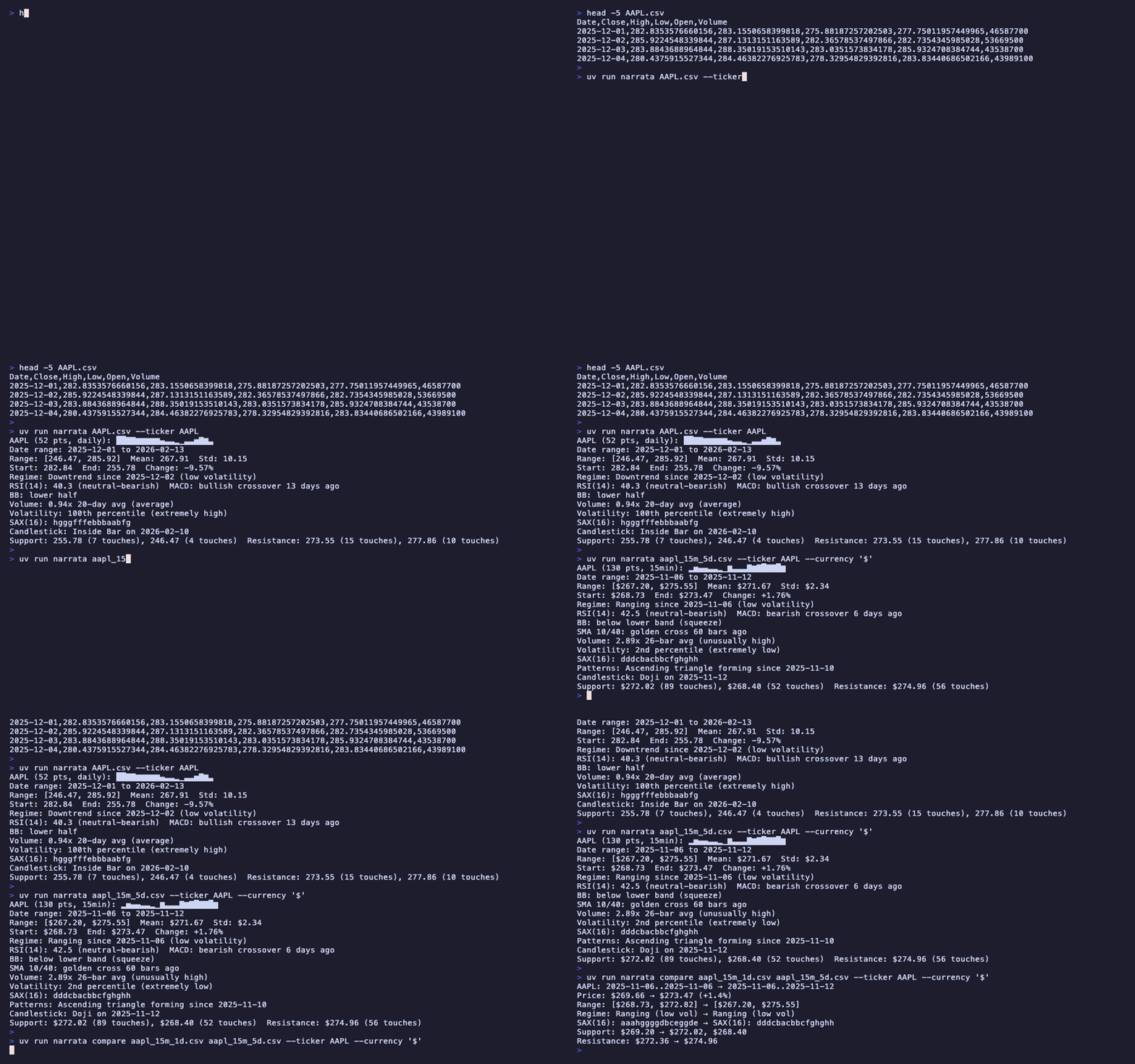
narrata includes a command-line tool that reads OHLCV data from CSV, TSV, or Parquet files (or stdin):
# Install with all extras
pip install "narrata[all]"

# Narrate a local CSV (format auto-detected from extension)
narrata prices.csv --ticker AAPL

# TSV and Parquet work the same way
narrata prices.tsv --ticker AAPL
narrata prices.parquet --ticker AAPL

# Pipe from stdin (defaults to CSV; use --input-format for others)
curl -s https://example.com/data.csv | narrata --ticker MSFT
cat prices.tsv | narrata --input-format tsv --ticker MSFT

# Output as JSON for programmatic consumption
narrata prices.csv --ticker AAPL --format json

# Control price precision (default: 2; use 0 for BTC, 4 for forex)
narrata prices.csv --ticker BTC --precision 0

# Use ASTRIDE instead of SAX for symbolic encoding
narrata prices.csv --ticker AAPL --symbolic-method astride

# Disable specific sections
narrata prices.csv --ticker AAPL --no-patterns --no-support-resistance

# Intraday data (frequency auto-detected, or set explicitly for patchy data)
narrata intraday_15m.csv --ticker AAPL --currency '$'
narrata intraday_15m.csv --ticker AAPL --frequency 15min

# Compare two periods side-by-side
narrata compare q1.csv q2.csv --ticker AAPL
The input must have a datetime column as its index and OHLC columns (Volume is optional). Column names are case-insensitive. Run narrata --help for all options.
Agent Integrations
narrata Skill
A reusable skill is included at skills/narrata/SKILL.md.
Depending on your CLI:
- Anthropic-style skills dir: copy to
~/.agents/skills/narrata/ - Codex-style skills dir: copy to
~/.codex/skills/narrata/
FastMCP Server
A dedicated MCP package is available on PyPI.
Full docs: src/narrata-mcp/README.md.
Claude Desktop configuration
Add to your `claude_desktop_config.json`:Intraday awareness
narrata auto-detects sub-daily frequencies (1min, 5min, 15min, 30min, hourly) and scales indicator defaults so that lookback windows cover the same calendar-time horizons as daily mode. For patchy or unevenly-spaced data where auto-detection may fail, pass the frequency explicitly via frequency="15min" in the Python API, --frequency 15min on the CLI, or the frequency field in MCP tools. Use frequency="irregular" for fully unstructured data with no fixed interval — this keeps daily-scale indicator defaults but labels units as "bars" instead of "days".
| Parameter | Daily | 15min | 5min |
|---|---|---|---|
| SMA crossover | 50 / 200 | 10 / 40 | 30 / 120 |
| Volume lookback | 20 days | 26 bars (~1 day) | 78 bars (~1 day) |
| Volatility lookback | 252 bars (~1 year) | 520 bars (~20 days) | 1560 bars (~20 days) |
RSI(14), MACD(12/26/9), and Bollinger(20) keep their standard defaults — practitioners use these across timeframes.
Output labels adapt automatically:
AAPL (130 pts, 15min): ▂▅▄▄▃▃▂▁▆▃▃▃▇▆▇█▇▇█▆
Date range: 2025-11-06 to 2025-11-12
Range: [$268.73, $275.55]  Mean: $271.67  Std: $2.34
Start: $268.73  End: $273.47  Change: +1.76%
Regime: Ranging since 2025-11-06 (low volatility)
RSI(14): 42.5 (neutral-bearish)  MACD: bearish crossover 6 days ago
BB: below lower band (squeeze)
SMA 10/40: golden cross 60 bars ago
Volume: 2.89x 26-bar avg (unusually high)
Volatility: 2nd percentile (extremely low)
SAX(16): dddcbacbbcfghghh
Patterns: Ascending triangle forming since 2025-11-10
Candlestick: Doji on 2025-11-12
Support: $272.02 (89 touches), $268.40 (52 touches)  Resistance: $274.96 (56 touches)
Features
- Input validation for OHLCV DataFrames
- Summary analysis with date range context
- Regime classification (
Uptrend/Downtrend/Ranging) - Intraday-aware indicators — auto-scaled SMA, volume, and volatility defaults for sub-daily bars
- RSI and MACD interpretation (uses
pandas_taindicator lines when available) - Volume analysis (ratio to moving average)
- Bollinger Band position and squeeze detection
- Moving average crossover detection (golden/death cross)
- Volatility percentile ranking
- SAX symbolic encoding
- ASTRIDE adaptive symbolic encoding (requires
ruptures) - Pattern detection plus candlestick detection (
pandas_tafirst, in-house fallback) - Support/resistance extraction
- Compact Unicode sparklines
- Output formatting helpers (
plain,markdown_kv,toon) - High-level
narrate(...)composition - Period comparison via
compare(...)
FAQ
Is narrata redundant if I already use OpenBB, yfinance, or another data SDK?
No. narrata is complementary.
It sits on top of your existing data layer and turns OHLCV data into compact, LLM-ready narrative text.
Typical flow:
Data source (OpenBB / yfinance / CSV / DB)
        -> pandas DataFrame (OHLCV)
        -> narrata
        -> concise narrative context for an LLM
narrata is data-source-agnostic: if you can produce a standard OHLCV DataFrame, you can use it.
Does narrata call an LLM or provide LLM endpoints?
No. This is intentional.
narrata is a pure Python library with deterministic, programmatic analysis and narration. It does not make LLM API calls and does not ship model endpoints.
Use it as a pipeline component:
This keeps the library lightweight, testable, and provider-agnostic.
Citation
If you use narrata in research, publications, or public projects:
@software{miklitz_narrata,
  author  = {Miklitz, Marcin},
  title   = {narrata},
  url     = {https://github.com/marcinmiklitz/narrata},
  license = {MIT}
}
You can also use the GitHub "Cite this repository" button or the metadata in CITATION.cff.